You're 6 days into the sprint. Someone asks "are we gonna make it?"
You
say "probably" — but you have no idea.
Stop guessing. See real progress through every status, surface critical blockers, and watch your backlog organize itself into themes your team actually uses.
Free tier available. No credit card required.
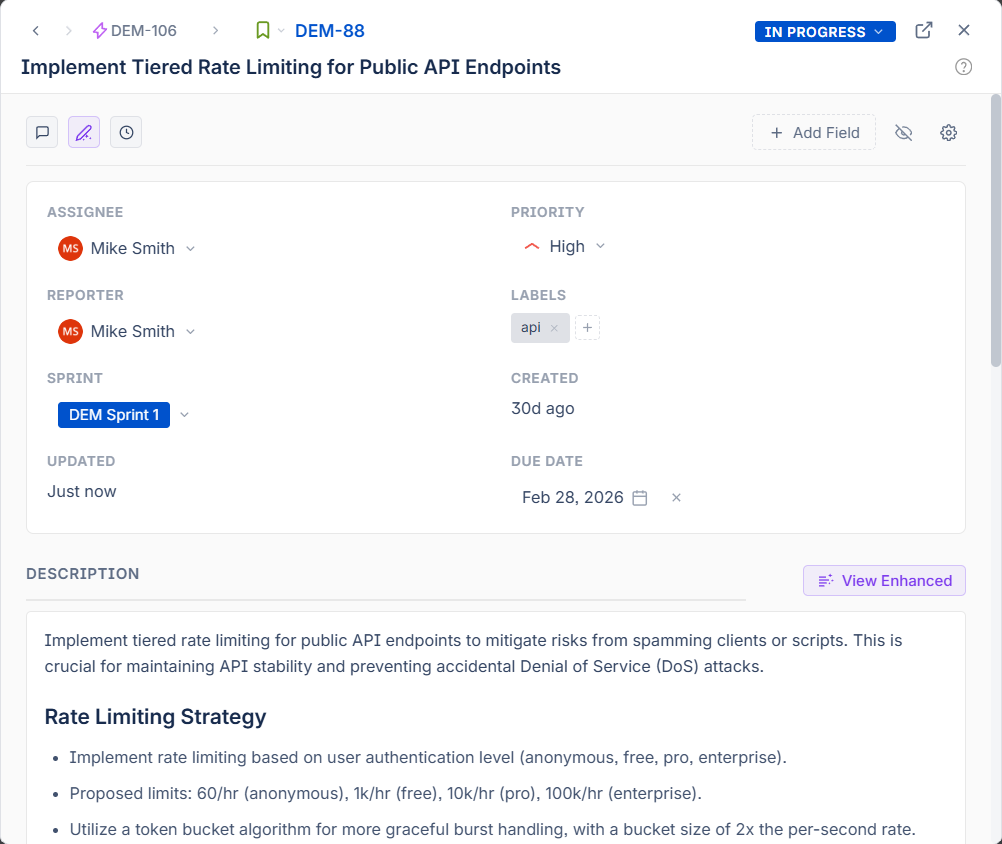
Click any issue key for an instant preview — edit fields, read summaries, navigate links, all without leaving your page.
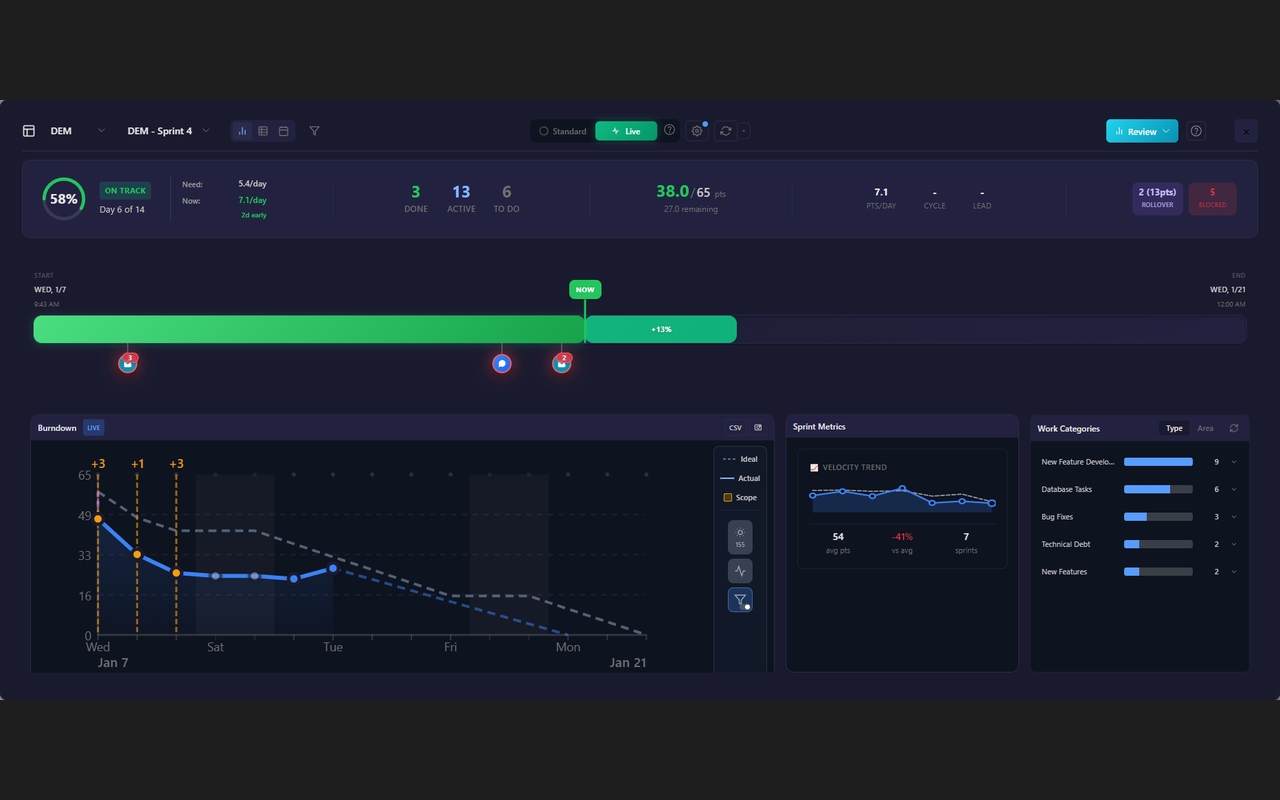
See your sprint's real progress at a glance — not just ticket counts, but actual work completed.
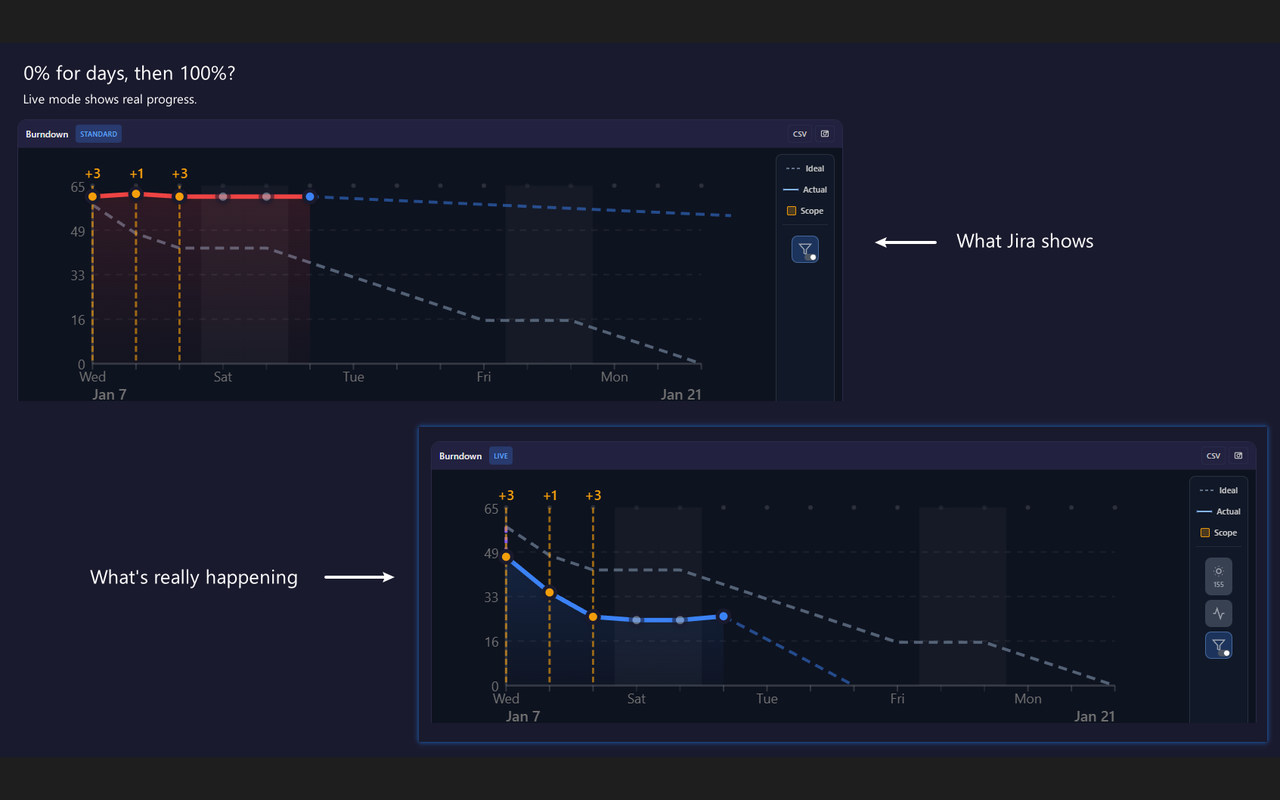
Track progress through every status. Know exactly how far ahead or behind you are.
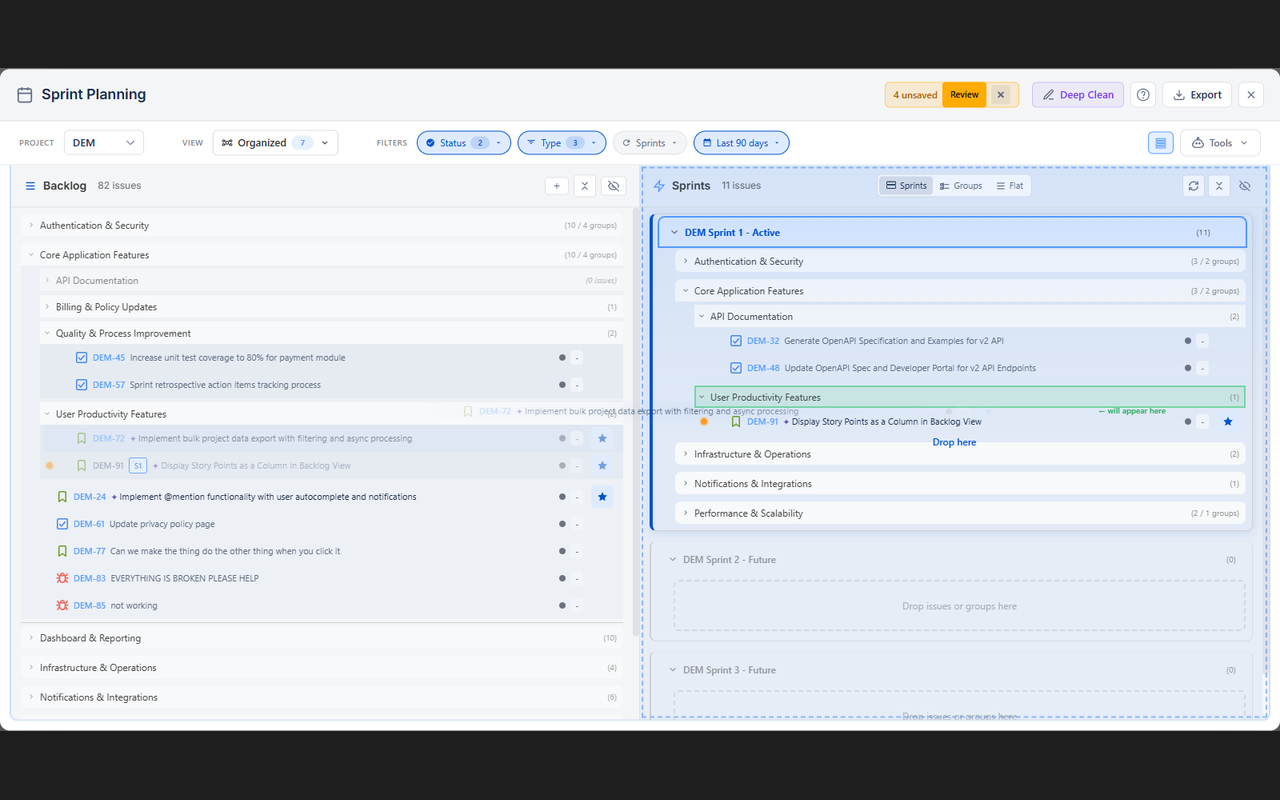
Your backlog organizes itself into themes. Drag entire groups to sprints in seconds.
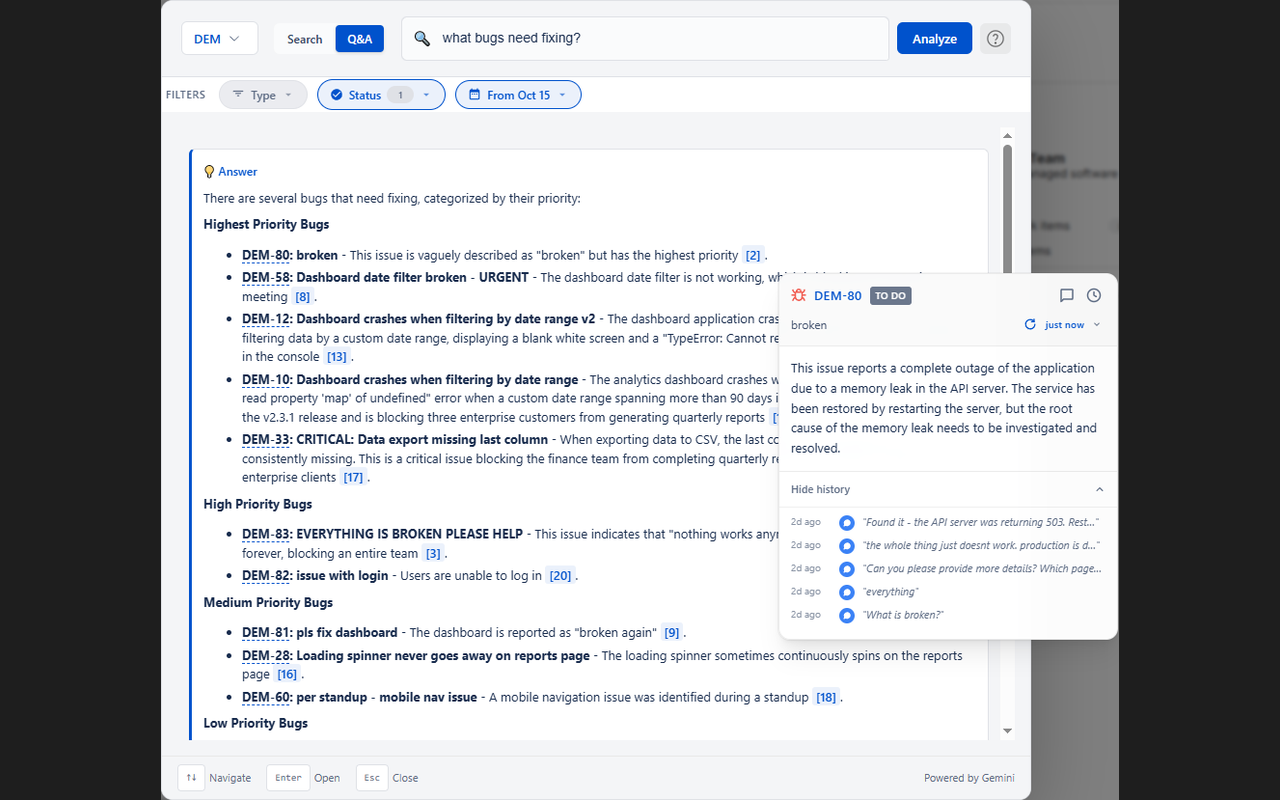
Ask questions in plain English. Get answers with citations linking back to source issues.
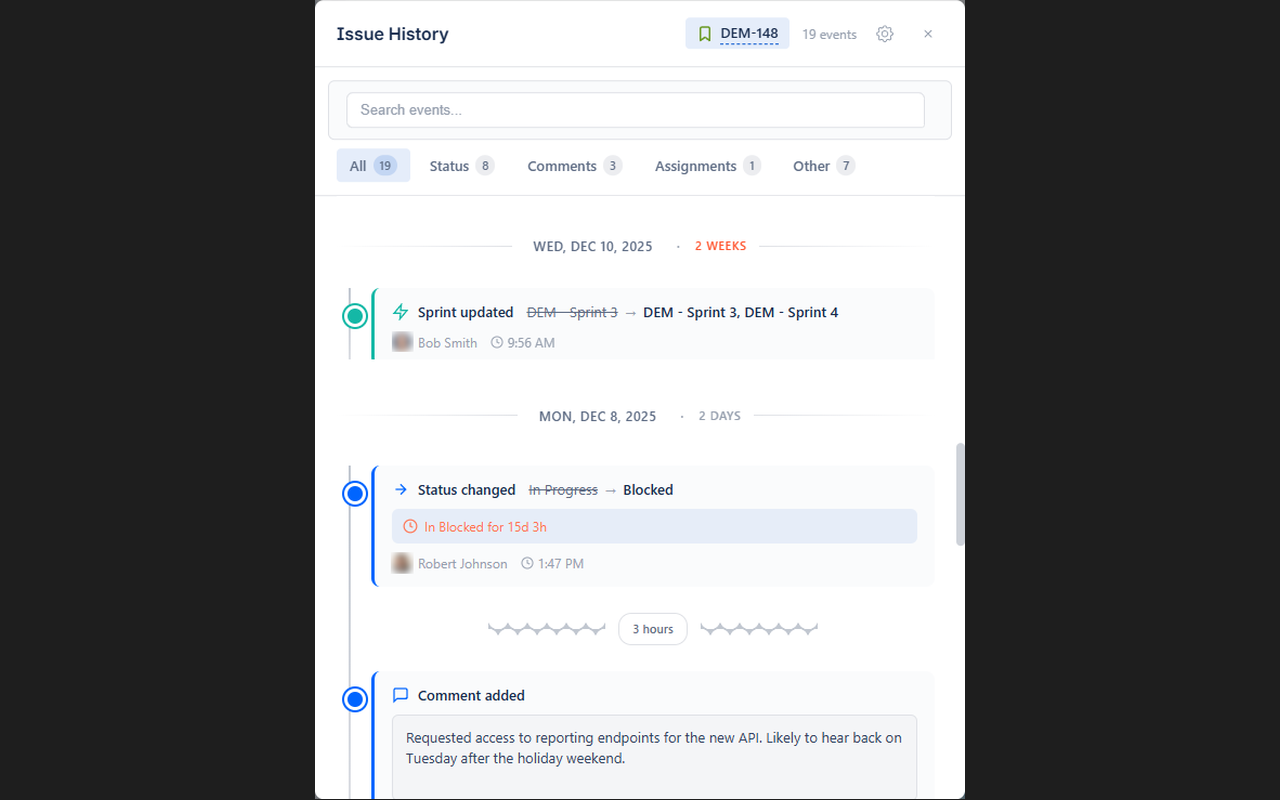
See the full journey: every status change, every sprint bounce, every delay visualized.
No configuration required. Seriously.
Add Steadyboard to Chrome with one click. No admin permissions needed.
Sign in with your Atlassian account. Secure OAuth — read-only by default.
Your dashboard appears instantly. No setup, no field mapping, no waiting.
These problems don't have to be your problems.
"I just want to check one field without opening the whole page."
Click any issue key for an instant preview. Edit fields inline, read summaries, navigate linked issues — without ever leaving your board. No more tab explosion.
"That ticket shows 0% until it's Done. Then suddenly 100%."
If an issue is 8 hours into Code Review and review typically takes 17 hours, it's 47% done — not 0%. Track progress through every status based on your team's actual patterns.
"50 comments on this ticket. I don't have 20 minutes to read them."
Hover any issue and see the key decisions in 2 seconds. Works on board cards, backlog items, anywhere. No clicking, no waiting — just hover and know.
"I just want to see all the bugs under this epic, grouped by assignee."
Group by epic, then status, then assignee — as many levels as you need. Filter, sort, and explore your issues the way your brain actually works.
"Wait, when did that ticket move to In Progress? I swear it was in Review yesterday."
Slide to any moment in your sprint. See exactly what your board looked like yesterday, last week, or any point in time. No more "I could've sworn..."
"How did we solve rate limiting issues last time?"
Type questions in plain English. Get answers with citations linking back to source issues. Learns your team's terminology — it knows what "auth" means to YOUR team.
"Sprint planning takes 2 hours. Scrolling through 200 tickets, dragging one by one, trying to remember what goes together."
Issues group themselves into themes that match how your team actually works — using your epics, components, and terminology. Duplicates surface on their own. Drag entire groups to sprints.
"When will this ship?" "Uh... soon?"
Estimates based on YOUR team's actual patterns. "Thursday 2pm, 78% confidence, blocked by PROJ-1247." Give stakeholders answers, not guesses.
"Why did this take 3 weeks when we estimated 3 days?"
See the full journey: 47 days in Backlog, kicked from Sprint 28, blocked 3 days on API team, 6 days in Review (2x average). Every delay. Every reassignment. Every sprint it bounced through.
"Writing tickets takes longer than fixing the bug."
Describe what you need in plain language. A complete ticket appears — summary, description, acceptance criteria, story points — ready to submit. Paste screenshots for context.
"My manager wants a status update. I have 47 open tabs."
Generate a stakeholder-ready report from your sprint data. Progress, blockers, risks, team highlights — formatted and ready to share.
"Who changed the priority on this? And when? And WHY?"
See the full history of any field — who changed it, when, and what it was before. Restore previous values with one click. Like version control for your tickets.
What you won't find in Jira — or any other tool.
No API keys. No field mapping. No workflow setup. Install, connect via OAuth, done. Your fields, workflows, and patterns are auto-discovered.
Official Atlassian OAuth — read-only by default, optional write access only when you choose. Your Jira content is never stored on our servers.
Every team works differently. Steadyboard learns your historical patterns, terminology, and workflows — then uses them to give accurate predictions.
No waiting for data to accumulate. Your existing Jira history is analyzed immediately. See insights from Day 1.
No separate app to manage. Steadyboard lives right inside your Jira tabs — dashboards appear exactly where you need them, when you need them.
Custom statuses, non-standard fields, unique terminology — Steadyboard adapts to how your team actually works. No rigid templates.
If any of these sound like you, Steadyboard will change how you work.
Start free. No credit card. Upgrade when you're ready.
Everything you need to try it out
billed annually ($228/yr) • or $29/month
For teams that need more
Everything you need to know before getting started.
Yes. Steadyboard uses official Atlassian OAuth — read-only by default. Optional write access is only requested for features like backlog organization, and you approve each action. We don't store your Jira content on our servers. AI features send issue content to Google Gemini for processing (with no data retention).
Steadyboard works with Jira Cloud out of the box. It automatically detects your custom fields, workflows, and story point configurations — no manual setup required. Jira Server/Data Center support is on our roadmap.
No. Steadyboard is a personal Chrome extension. You just need to be able to install Chrome extensions and have access to your Jira instance. No Jira admin permissions required — it only uses the same access you already have.
After your 14-day Pro trial, you can continue using Steadyboard Free forever — no payment required. Free includes the sprint dashboard, standard burndown, velocity tracking, and issue timelines. Upgrade to Pro anytime for advanced features.
Yes! Your subscription is linked to your Jira account, not your device. Just sign into Jira on any computer and Pro activates automatically.
Steadyboard uses AI to summarize comments, answer questions about your projects, and organize your backlog into themes. The AI learns your team's terminology and context from your Jira data. All processing happens securely — your data is never used to train models.